
Troubleshoot
Defender can't be disabled
Covers fixes for the Defender issue
Since February 2023 updates, Tamper Protection and other security features have been improved in Windows, thus it made harder to disable Defender even with TrustedInstaller. Here are some solutions to disable Defender:
Solution 1
- Open Terminal (PowerShell) as administrator and enter:
& "$env:ProgramFiles\Revision Tool\revitool.exe" tweaks security defender enable --forceThis repairs corrupted Defender conmponents.
- Restart your PC
- Open Terminal (PowerShell) as administrator again and enter:
& "$env:ProgramFiles\Revision Tool\revitool.exe" tweaks security defender disable --force- Restart and verify that Defender is disabled via Revision Tool
Solution 2
- Press Win + R on your keyboard and enter
msconfig - Go to the Boot tab
- In the Boot options section, enable Safe boot
- Apply & OK and restart
Once your system boots in Safe mode, merely open Revision Tool, go to Security and simple disable Defender. Once finished, disable Safe boot following the same way as the enabling process to boot in normal mode.
Solution 3
- Open Terminal (PowerShell) as administrator and enter:
& "$env:systemroot\system32\reagentc.exe" /enable- Download this file and move it to the
C:\partition - Press Win + R on your keyboard and enter
ms-settings:recovery - Select Restart now from Advanced startup:
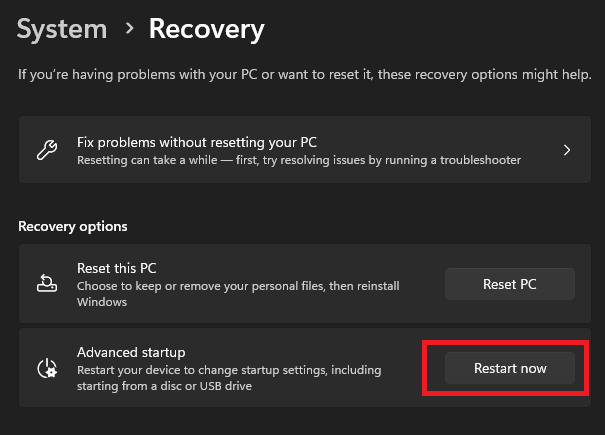
- Go to Troubleshoot → Advanced options → Command Prompt, wait a couple of seconds
- Select your account and press Continue even if you don't have a password
Once a command prompt shows up, enter regedit and select HKEY_LOCAL_MACHINE just like here:
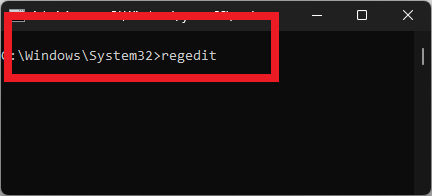
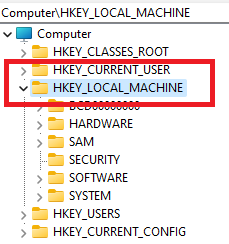
- Then click on the
Filetab andLoad Hive...
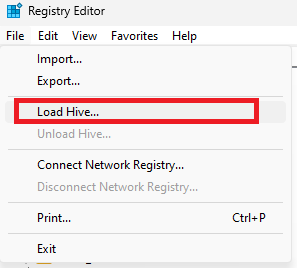
- Go to
C:\Windows\System32\configand selectSYSTEM
If it isn't C:\ for you, look up for your drive by searching
revi-defender.reg on the root of your Windows drive.
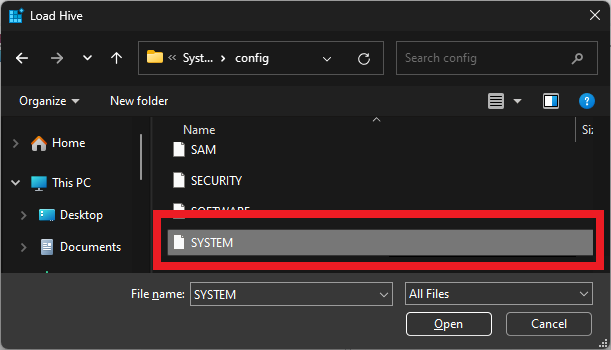
- set Key Name to
revi
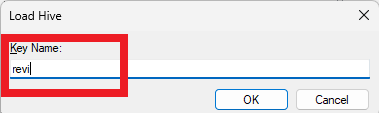
It must be set to
revi!- Click on the
Filetab again and selectImport..., chooserevi-defender.regfrom your Windows drive and click OK - Select
HKEY_LOCAL_MACHINE\revi, click on theFiletab and pressUnload Hive..., then close the Registry Editor - Restart
- Open Terminal (PowerShell) as administrator and enter:
& "${env:ProgramFiles}\Revision Tool\revitool.exe" tweaks security defender disable --force- Restart and verify that Defender is disabled via Revision Tool